
Settings on iPhone
Settings is a sheet. Open it with the gear at the top left of Home, or with your initials at the top right to land on the Account page. Done closes it.
The list
Section titled “The list”At the top is a card with your initials, a name made from your email address, and View account. When signed out it says Not signed in · Sign in to keep this phone in step. Below it:
- Sync, General, Appearance
- Under Library: Reading, Rooms
- Under This phone: Storage, Privacy
- Leaving
Account
Section titled “Account”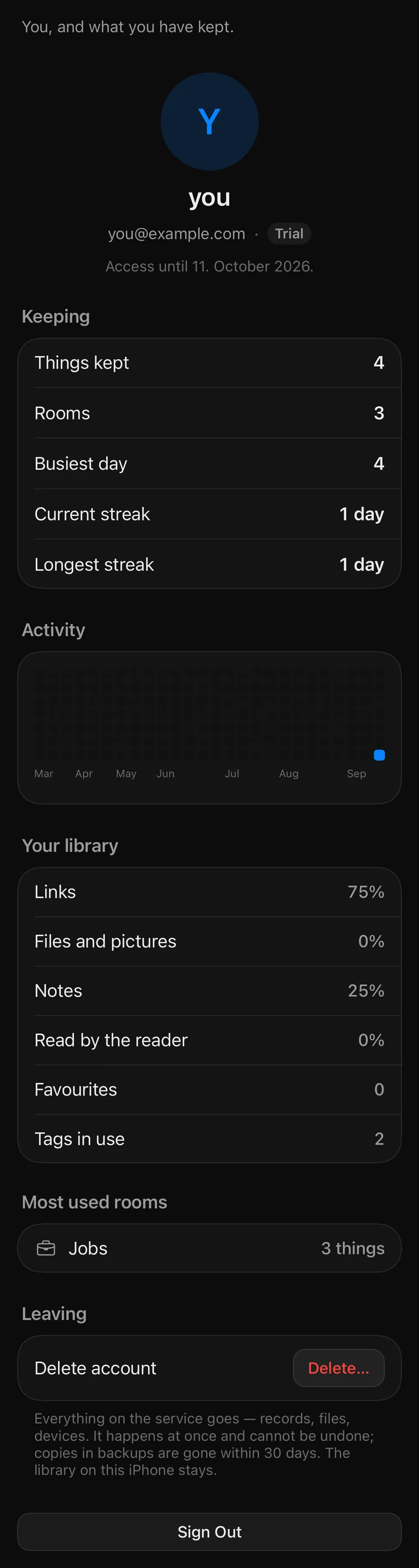
- Your initials, your handle, your email, and your plan: Trial, Pro, Lifetime or Your own keys. A subscription also shows Access until with the date.
- Copilkag: things kept, rooms, busiest day, current streak, longest streak.
- Activity: a heatmap of the last twenty-six weeks.
- Your library: what share of it is links, files and pictures, and notes; how much the reader has read; favourites; tags in use.
- Most used rooms: the top five.
- Other devices: each Mac or iPhone on the account with when it was last seen and Remove. Shown only when there are others. See Devices.
- Leaving: Delete account with Delete…, and the note that everything on the service goes at once, that copies in backups are gone within thirty days, and that the library on this iPhone stays.
- Sign Out, at the very bottom.
This phone and your Mac, in step through Copilka’s service.
- Sync this library: the switch. The library goes to Copilka’s own service, sealed under your keys, and comes back on your Mac. Off, this phone is a notes app.
- Status, and Sync now. Pulling down on any board does the same. Usually there is no reason to.
- Not synced: one row per thing the service refused, when there is any.
- Signed in as, Cloud storage (Included or Not included), and Passes finished since the app opened.
- How it travels: the paragraph on when sync runs, quoted on Sync on iPhone.
General
Section titled “General”How Copilka opens on this phone. One setting: Opens on, the screen the app starts on. Home is the tiles, the recent and the rooms; a board opens with Home one tap back.
Appearance
Section titled “Appearance”- Colour scheme: System, Light or Dark. Dark is Copilka’s own. System follows the phone.
- Accent: Blue, Purple, Pink, Red, Orange, Green or Graphite.
- App icon: Original, Cobalt, Crimson, Dawn, Sky, Prism or Blueprint. These change the icon on your home screen.
Reading
Section titled “Reading”What happens to a thing once it is saved.
- Read what is saved: Pages are read as they arrive. Off, nothing is fetched until Read is pressed.
- Ask what pictures are: A photograph of a receipt is offered as a receipt. On the phone the offer shows up as the pre-set kind in Read again; see Saving on iPhone.
- Reveal new text: A title the reader wrote arrives letter by letter.
- Show prices: Prices on the cards of things that have one.
- Duplicates: what saving something already in the library does. Mention it or Say nothing.
- Confirm before deleting: A question first; the six seconds of Undo either way.
- Read as you is described here as the Mac’s: a room’s sites are read with your own session on your Mac, not on the phone. See Read as you.
Where things are kept. Default room is where saves land unless a room is open. Below it, every room with the names of its properties, or No properties, and a ⋯ menu with the room actions plus Add properties: Jobs, Reading, Shopping, Trips, Recipes, or One property… for your own. New Room is at the top. See Properties.
Storage
Section titled “Storage”What Copilka keeps on this phone.
- Records: The library itself: every card, room and reading.
- Files: Pictures and files saved here or fetched, under their hashes.
- Previews: Thumbnails, made again when they are needed.
- Clearing: Previews and the Page cache each have a Clear button. Downloaded files are not cleared from here; delete the item to let its file go.
Privacy
Section titled “Privacy”What leaves this phone, and when.
- Ask the reader: A saved page is read through Copilka’s service, which keeps nothing of it.
- Render pages: Pages that need a browser are rendered by the service.
- What the phone holds: No key of your own, no analytics, no crash reporter. The session lives in this app’s keychain; the entitlement is a signed token the service can revoke. Whether the library itself leaves the phone is the Sync page’s switch.
See What leaves your device for the whole picture.
Leaving
Section titled “Leaving”- Sign Out: The library on this phone stays; the session goes.
- Delete account → Delete…: the sheet asks you to type your email address to confirm. Everything on the service goes — records, files, devices. The library on this phone stays.